
Institutional FX intelligence.
Two ways to get access.
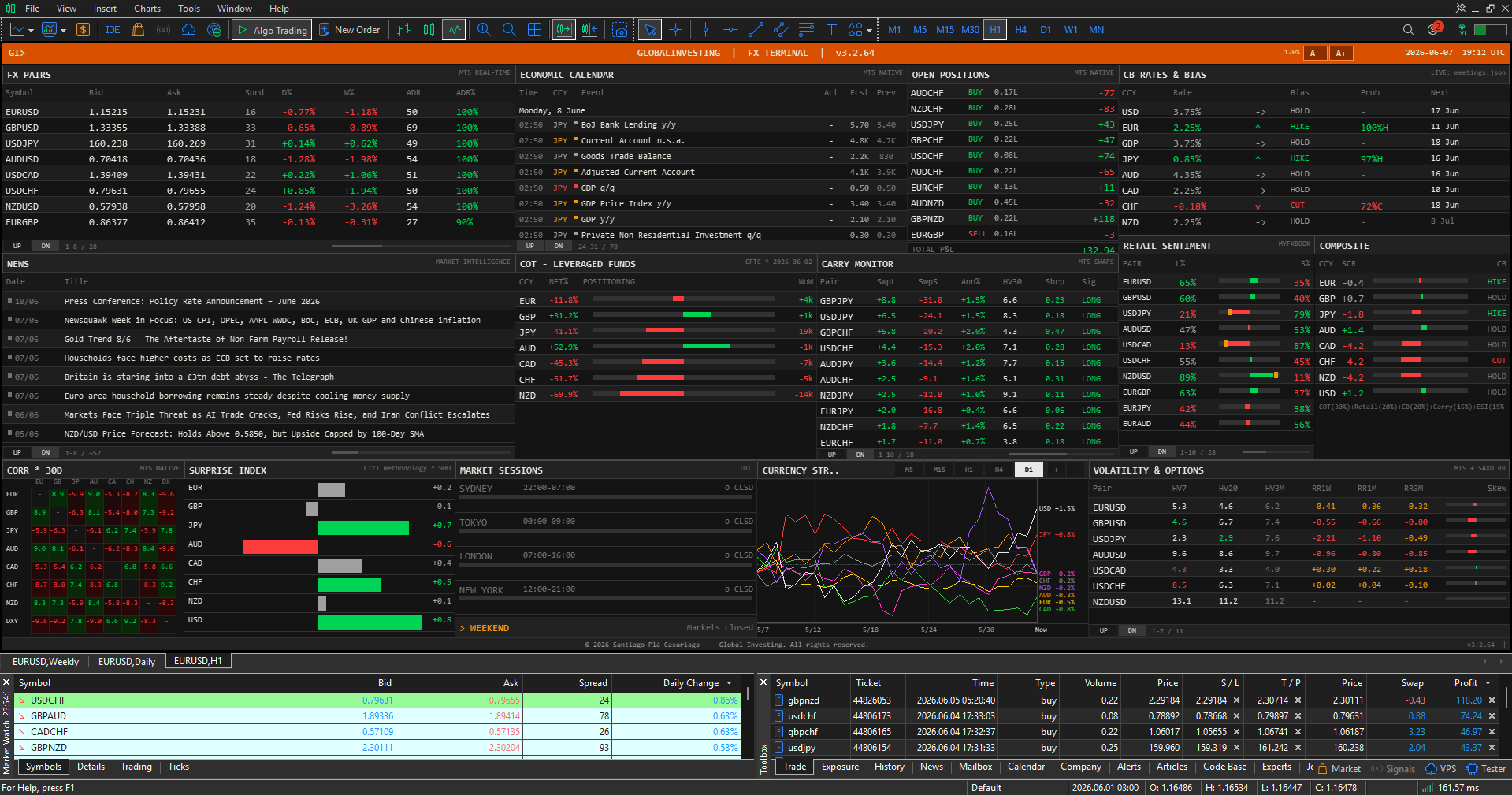
A MetaTrader 5 Expert Advisor with a native chart overlay — zero-flicker canvas, live broker swaps, MT5 push alerts — plus a companion web terminal covering the full macro suite: CB bias, COT positioning, carry, and AI narrative. Access by renting the MT5 EA or by opening a verified account with Vantage or TMGM, our partner brokers — all three unlock the same web terminal.
What you get
A MetaTrader 5 Expert Advisor and a browser-based web terminal, sharing the same underlying data pipelines — CB bias, COT, sentiment, carry, and news. Each platform adds layer-specific capabilities that complement the other.
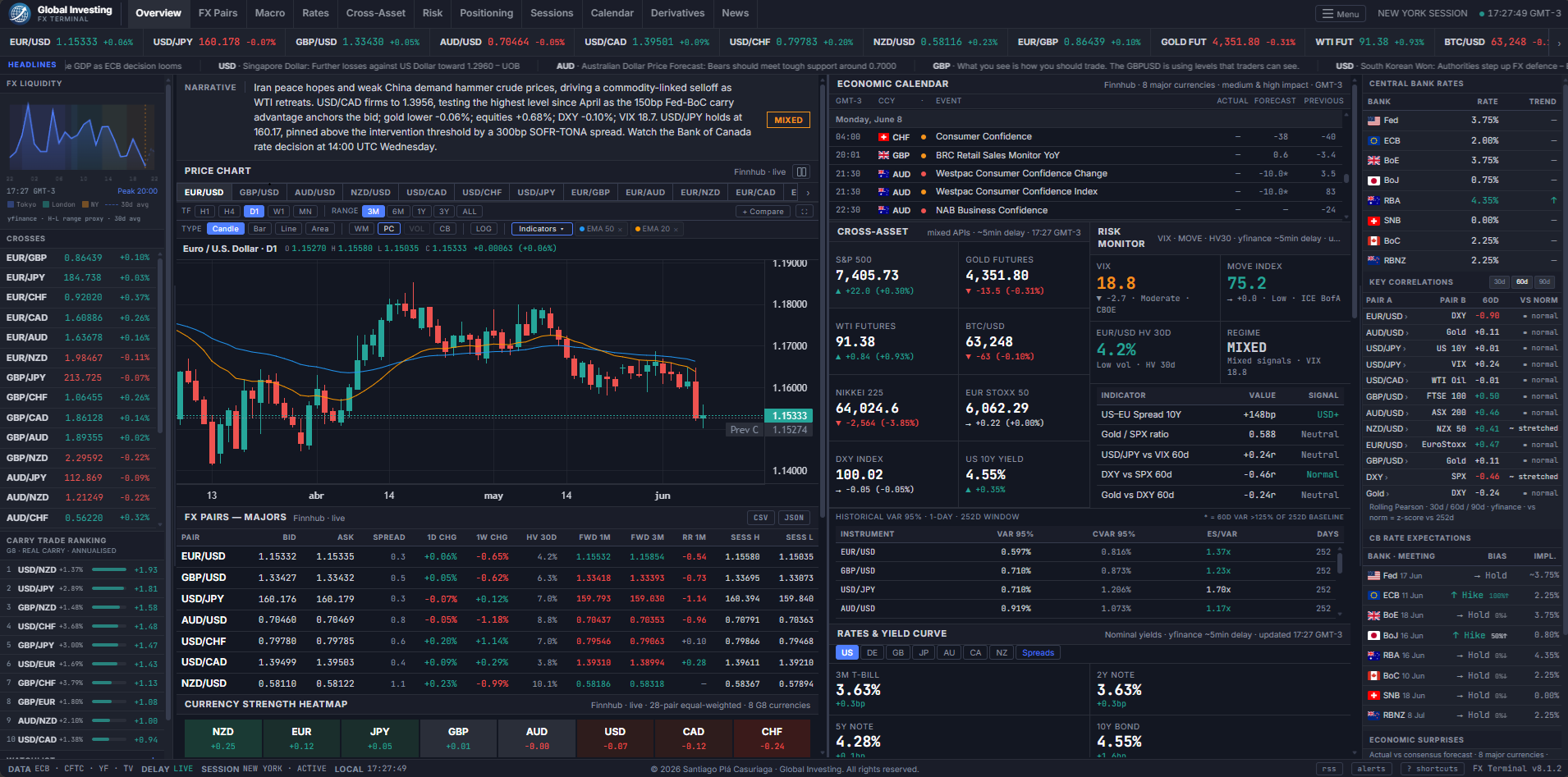
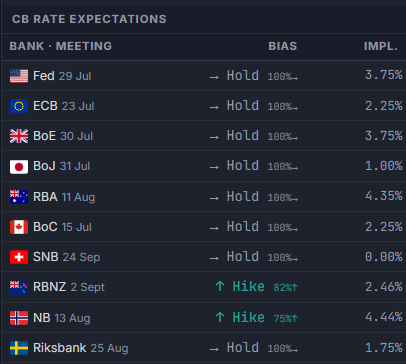
OIS-implied cut/hold/hike probabilities for all 10 G10 central banks, built on each bank's own reference rate — SOFR, ESTER, SONIA, TONA. Every meeting on the calendar, with the market-implied bias at a glance.
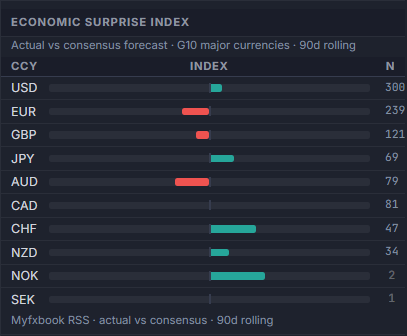
Decay-weighted actual-vs-forecast scoring per G10 currency, normalized with a 90-day rolling z-score — the same Citi-methodology convention institutional desks already use, so a hot or cold print registers instantly against its own history.
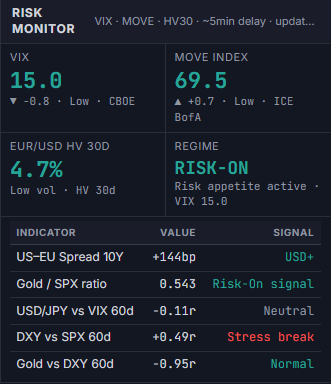
Live VIX, MOVE index, and credit-spread readings — US HY OAS 20-day change — drive a composite regime score — RISK-ON, MIXED, CAUTION, or RISK-OFF — cross-checked against a table of rolling cross-asset correlation and credit-stress signals that flag when a historical relationship breaks down.
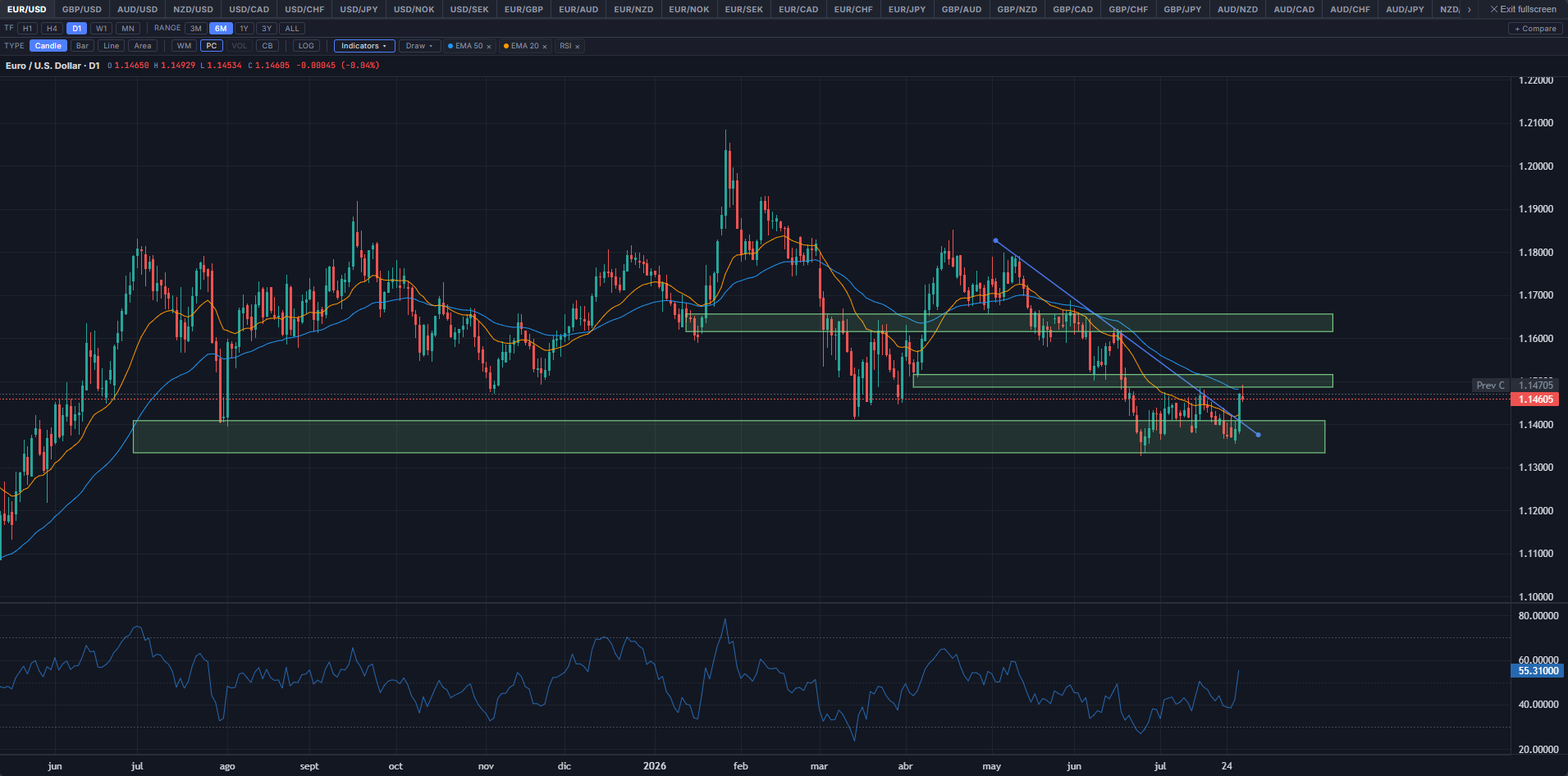
Native OHLC chart across 49 instruments — every G10 FX pair and cross, Gold, Silver, WTI, Brent, DXY, major equity indices, BTC/USD, ETH/USD, VIX, and MOVE — with a full indicator library (MA, RSI, MACD, and more) and a chart-object drawing toolkit — trend lines, rectangles, Fibonacci — with copy-paste, free placement into forward time, and a dedicated fullscreen mode.
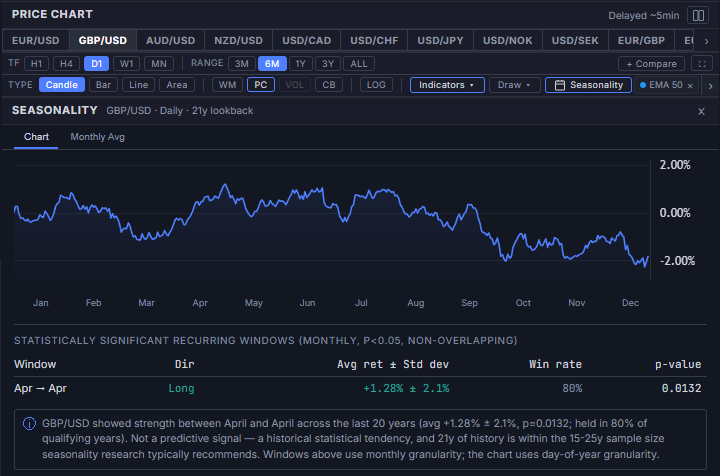
A day-of-year seasonal curve per instrument, backed by a table of statistically significant recurring windows (p<0.05, non-overlapping) — direction, avg return ± std dev, win rate, and p-value, not just a raw average. A second Monthly Avg tab lays out the same history as a compact month-by-month table. Opens in fullscreen alongside the price chart, with lookback depth varying by instrument's real available history.
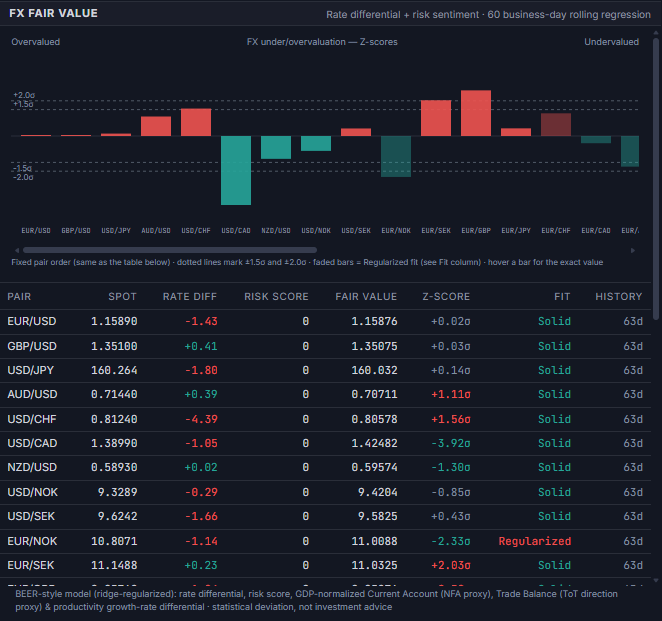
A BEER-style model — rate differential, risk-sentiment score, GDP-normalized Current Account (NFA proxy), Trade Balance (terms-of-trade proxy), and productivity growth-rate differential — fitted per pair via ridge regression with blocked 5-fold cross-validated λ over a 60 business-day rolling window, all 32 tracked pairs. Each row's Fit column discloses whether that pair is Solid (well-identified under plain OLS) or Regularized (ridge doing real shrinkage work), and the Z-score is walk-forward computed to avoid look-ahead bias.
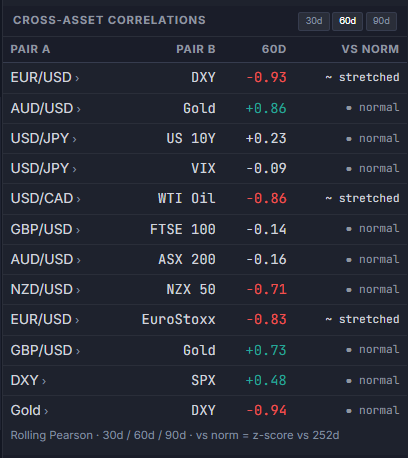
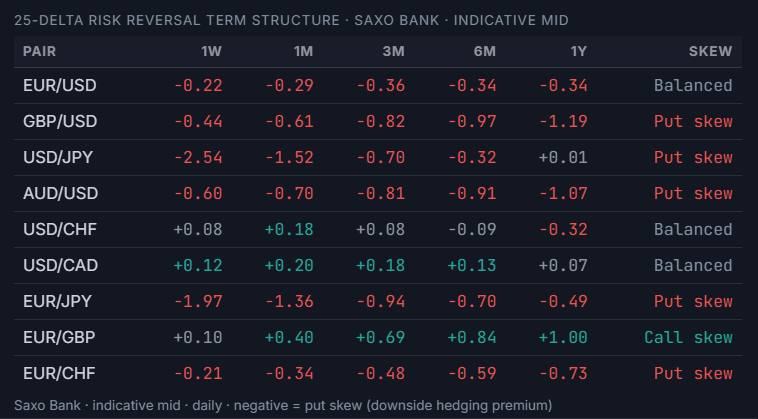
Nine more panels — Dollar Smile, cross-asset correlations, the full pair×pair correlation matrix, derivatives, carry, currency strength, COT full breakdown, yield curve & sovereign spreads, and news. Select one to preview it at full size.
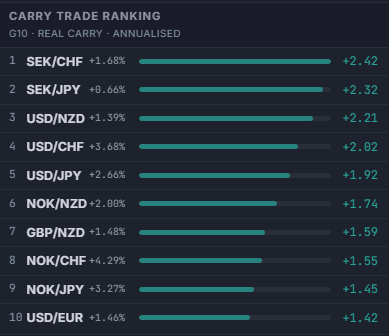
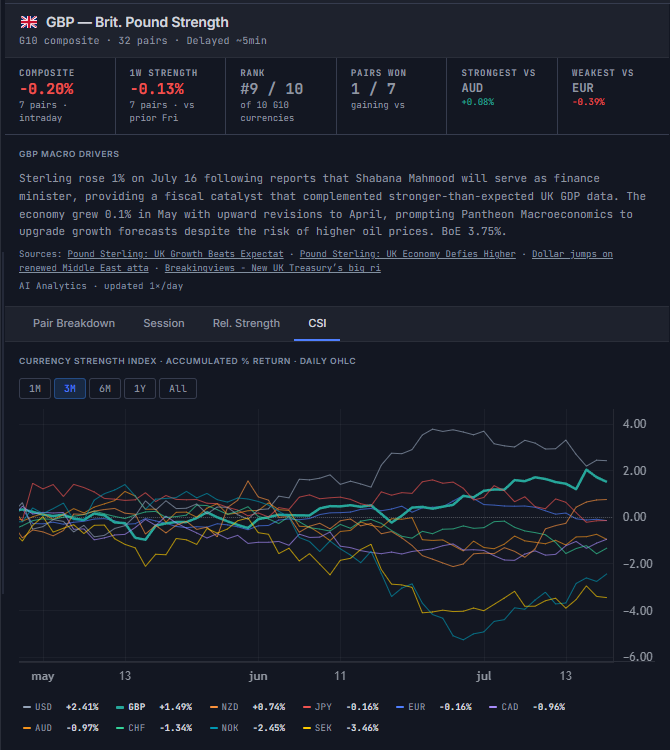
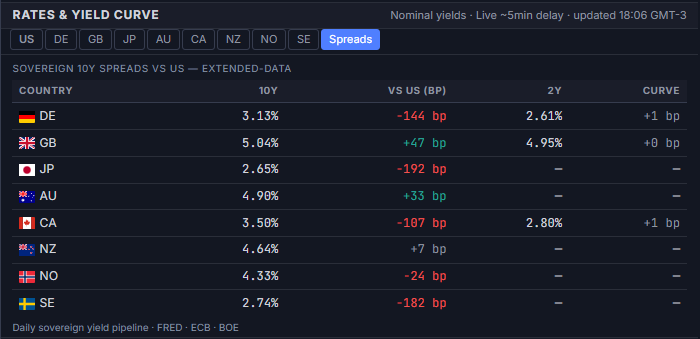
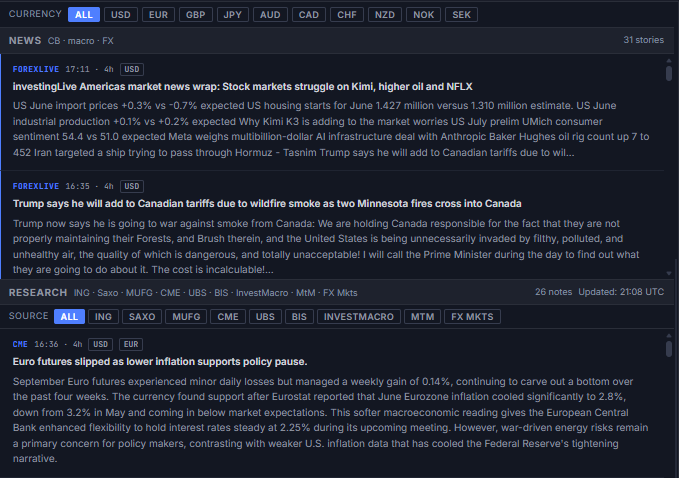
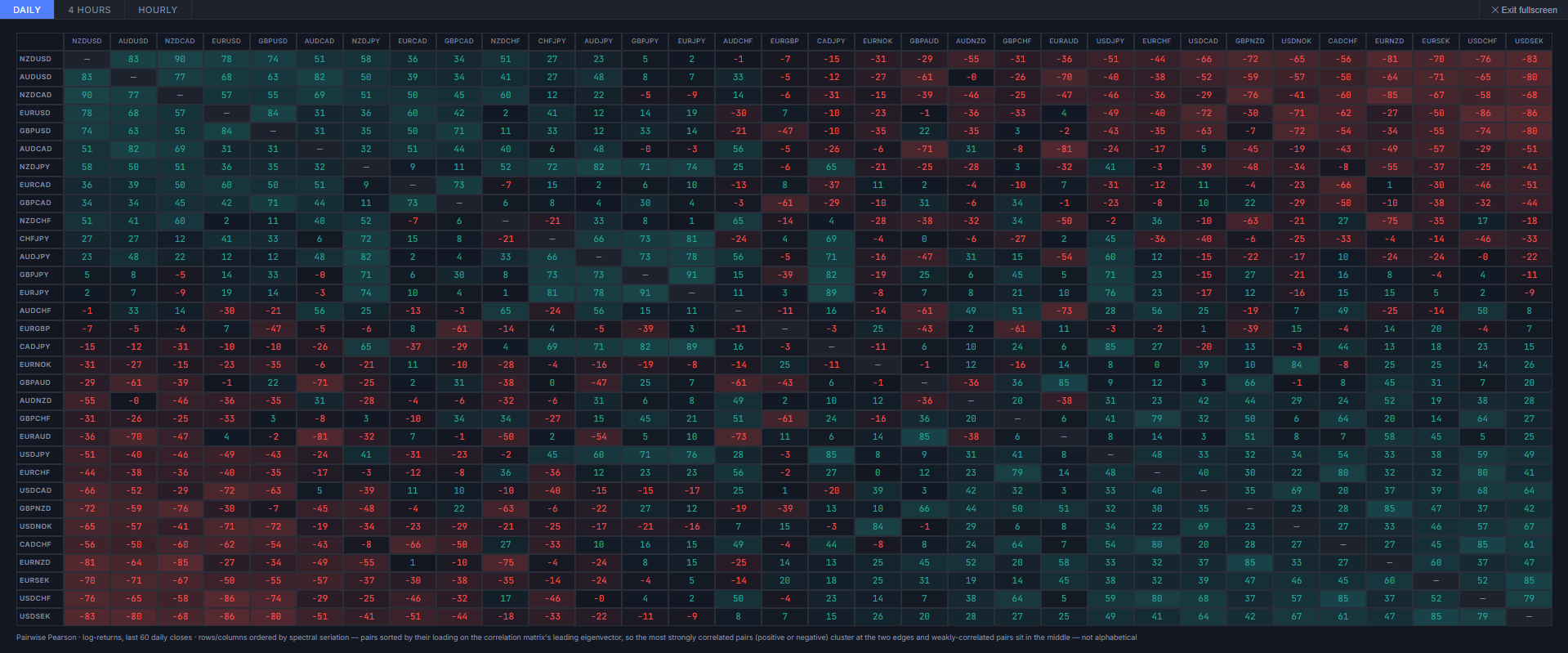
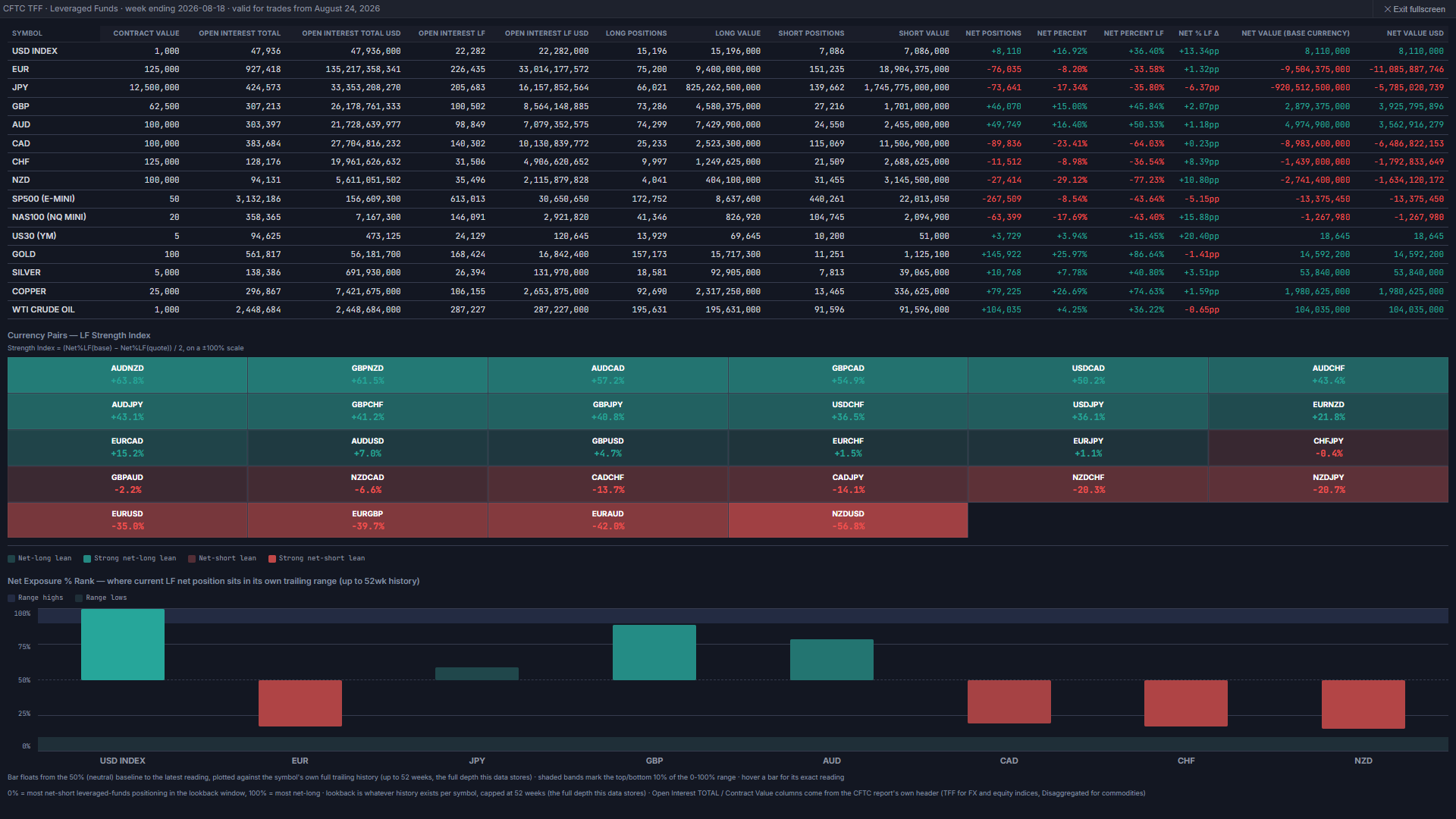
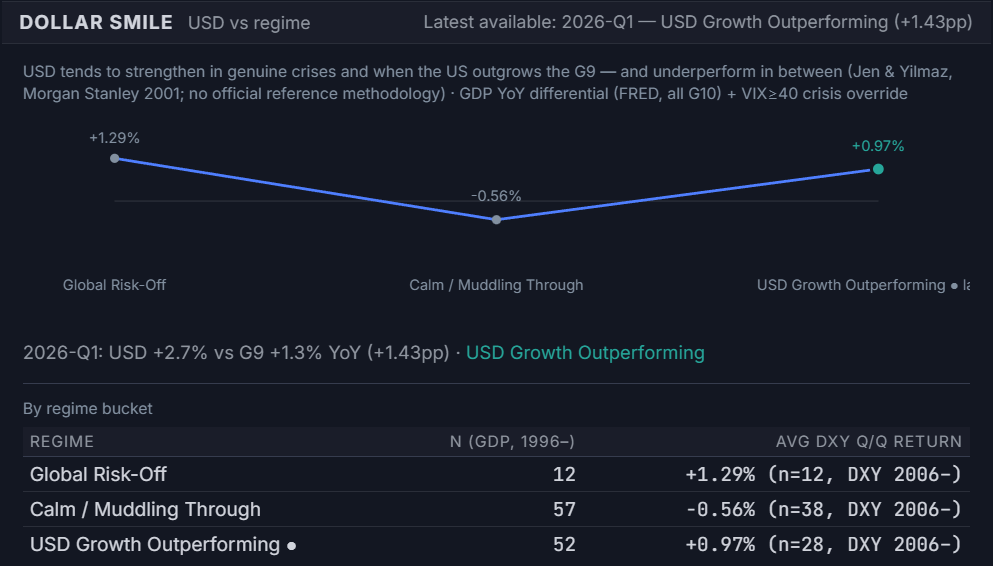
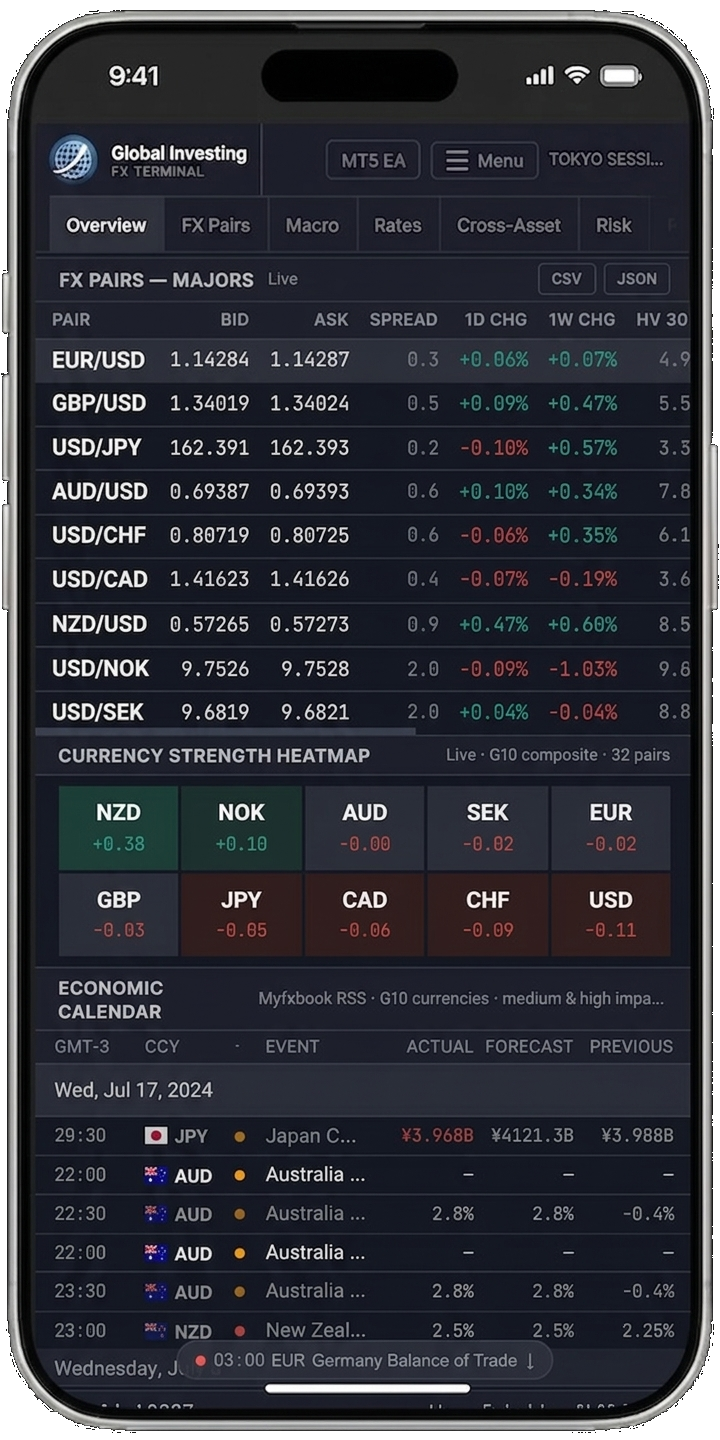
The three-column desktop layout reflows into a single scrollable column on any phone or tablet — same data, no reduced feature set. FX Pairs, Currency Strength Heatmap, and the Economic Calendar sit at the top of the feed, followed by the AI market narrative and price chart, then the full Cross-Asset and Risk Monitor content further down. Same data pipelines, same refresh cadence, no separate mobile build.
Full feature breakdown
| Panel / Feature | MT5 EA | Web Terminal |
|---|---|---|
| Live FX prices | ✓ MT5 native (tick-by-tick) — 28 pairs + up to 8 NOK/SEK crosses if offered by your broker | ✓ Real-time WebSocket — 32 pairs |
| CB rates & policy bias | ✓ | ✓ |
| CB rate expectations (OIS) | ✓ | ✓ |
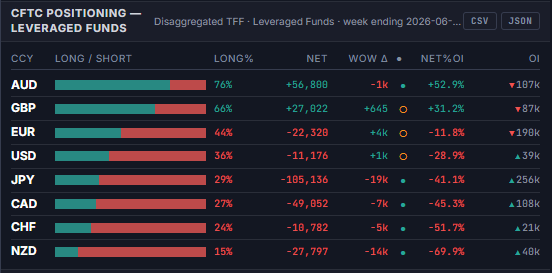
| COT / CFTC positioning | ✓ | ✓ |
| Carry trade monitor | ✓ Live broker swaps | ✓ |
| Retail sentiment (Myfxbook) | ✓ | ✓ |
| Currency strength (CSI) | ✓ | ✓ |
| Economic calendar | ✓ MT5 native | ✓ Native panel |
| Economic Surprise Index | ✓ | ✓ |
| Market sessions | ✓ | ✓ |
| Correlation matrix | ✓ MT5 native | ✓ 60-day rolling |
| Volatility & options | ✓ | ✓ |
| News headlines | ✓ | ✓ |
| Open positions (live account) | ✓ MT5 native | — |
| Alert system (popup / push) | ✓ | — |
| Full price chart (OHLC history) | — | ✓ LightweightCharts |
| US Treasury yield curve | — | ✓ |
| Cross-asset correlations | — | ✓ 60-day rolling window |
| Derivatives suite | — | ✓ 25d RR, implied forwards, realized vol, ECB fixings, DTCC volume |
| FX Fair Value | — | ✓ Rate differential + risk regression, 32 pairs |
| Dollar Smile | — | ✓ USD by regime — GDP differential + VIX crisis override |
| Seasonality | — | ✓ Day-of-year curve, p<0.05 significance-tested windows |
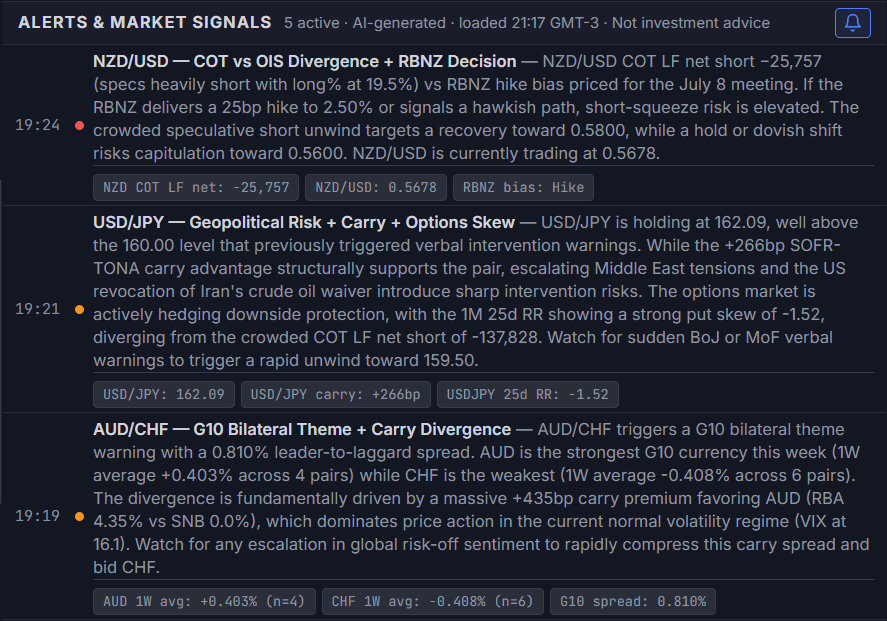
| AI narrative & market signals | ✓ Per-pair, in popup | ✓ 4×/day |
| FX liquidity canvas | — | ✓ |
Both interfaces share the same underlying data pipelines for CB bias, COT, sentiment, and news.
Pricing & access
Three paths to full web terminal access: rent the MT5 Expert Advisor, open a verified account with Vantage or TMGM, or request a 14-day trial.
Do I need to buy the EA to use the web terminal?
No. The MT5 Expert Advisor and the verified-broker-account paths are all independent — any one of them unlocks full access to the web terminal on its own. The EA additionally runs the native MT5 chart overlay; the broker-account paths do not require MT5 at all.
How does the 14-day trial work?
Send us your name and the email address you'd like the access link sent to. We'll reply with a one-click activation link — no MT5 account, EA purchase, or broker account needed. The trial unlocks every panel for 14 days; after that, continue with the MT5 EA rental or a partner-broker account above.
Does opening a Vantage account include the web terminal?
Yes. Opening and verifying a live trading account with Vantage — one of our two partner brokers, ASIC- and FCA-regulated — unlocks full web terminal access: every panel, for 30 days, renewing automatically while the account stays active. No MT5 EA purchase is required. We may receive compensation from partner brokers for accounts opened this way, at no cost to you.
Does opening a TMGM account include the web terminal?
Yes. Opening and verifying a live trading account with TMGM — one of our two partner brokers, ASIC-regulated — unlocks full web terminal access: every panel, for 30 days, renewing automatically while the account stays active. No MT5 EA purchase is required. We may receive compensation from partner brokers for accounts opened this way, at no cost to you.
Getting started
Four steps from purchase to live data. The web terminal activates automatically once your EA key is generated.
Allow WebRequest for raw.githubusercontent.com under Tools → Options → Expert Advisors. The dashboard will render on the chart.XXXX-XXXX-XXXX. Click the key to copy it. The key is derived from your MT5 account number and broker server name.Standalone MT5 indicators
Available separately on MQL5 Market. Each integrates with the terminal data pipelines.
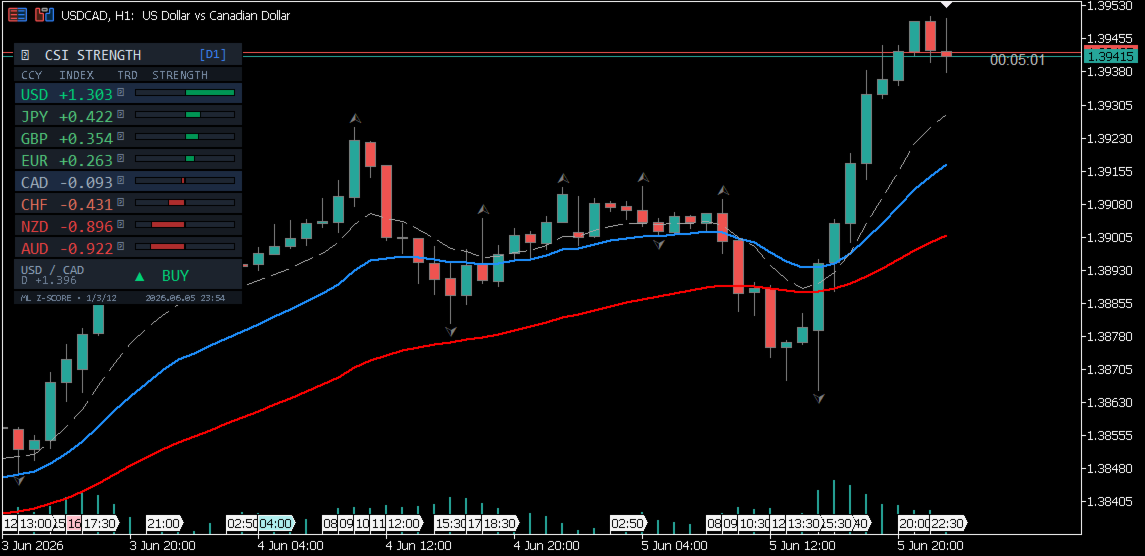
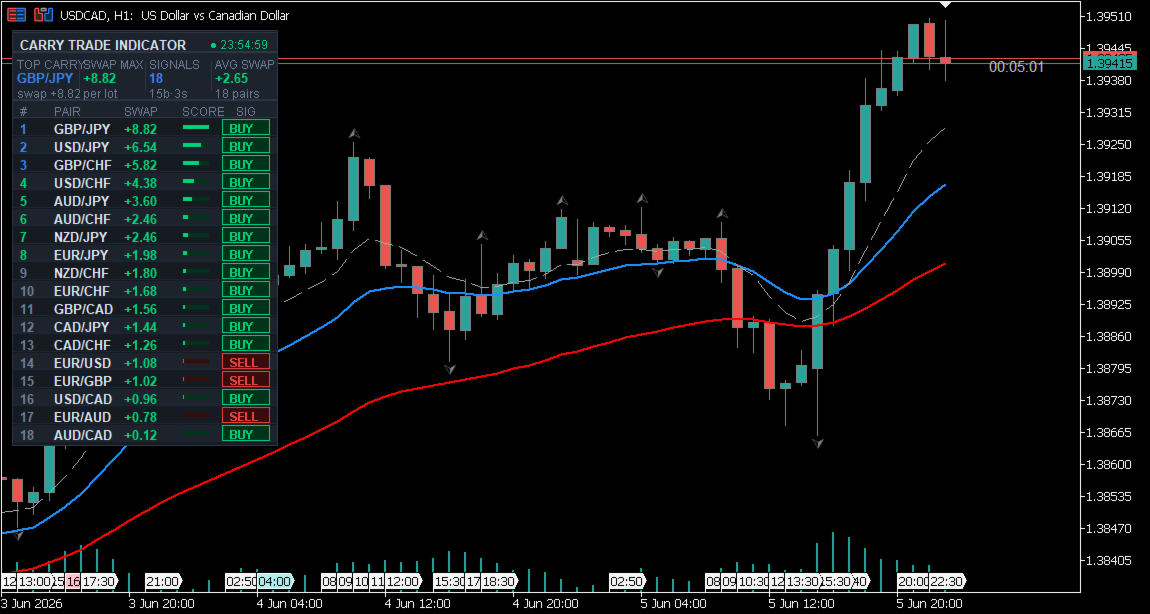
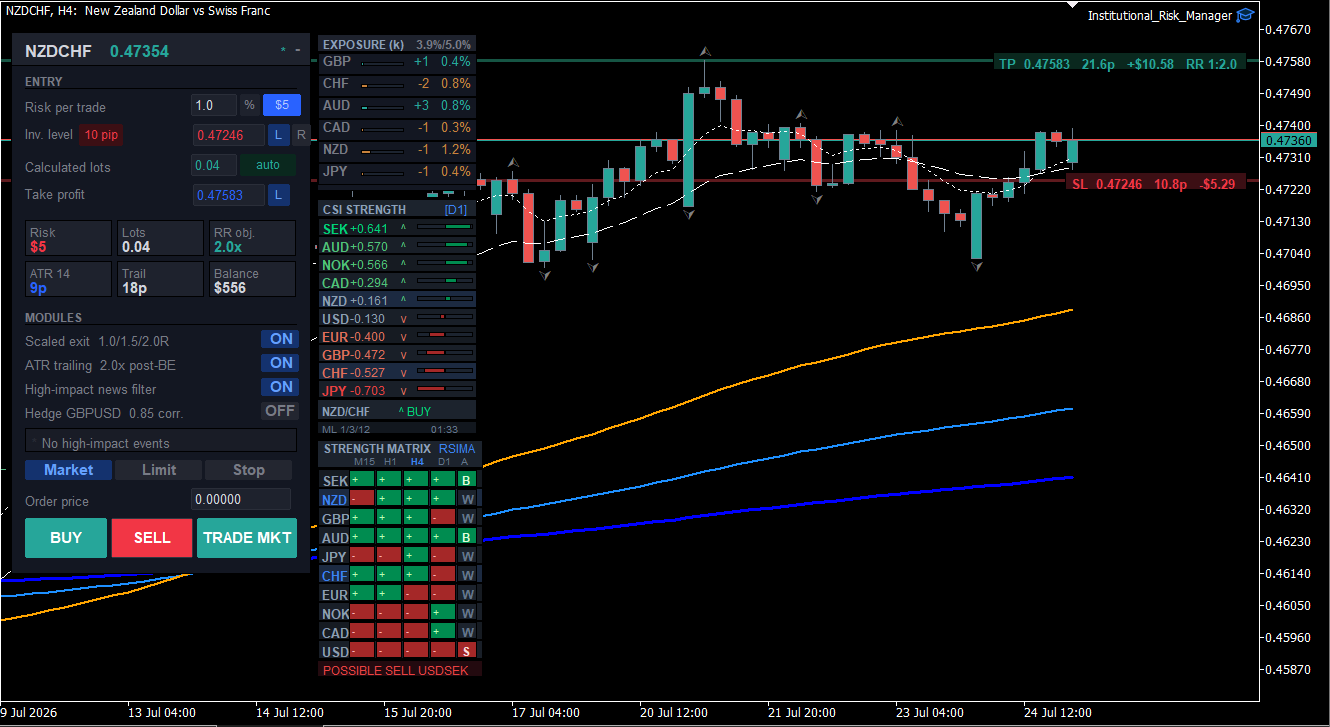
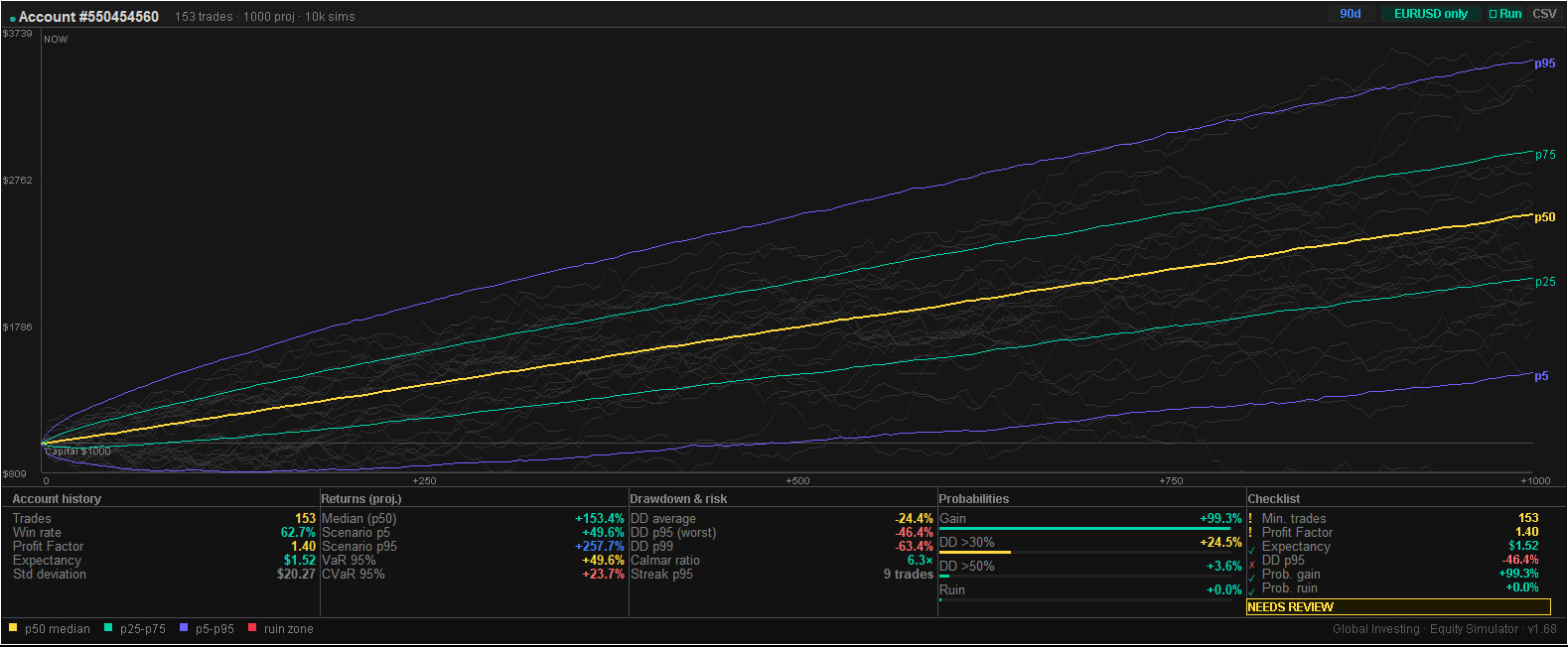
Full catalogue → mql5.com/en/users/santiagopla/seller
How the data works
Reference answers on data freshness, update cadence, and how each panel's underlying figure is computed.
How real-time is the forex data?
FX pair prices stream in real time during market hours via WebSocket. The quote bar label changes from a delayed timestamp to 'Live' on the first tick. Non-FX instruments (Gold, WTI, BTC, US 10Y, DXY) update every ~5 minutes. During weekends and off-hours when the FX market is closed, the last available closing price is displayed.
What does the Currency Strength Heatmap show?
It shows the relative strength of all 10 G10 currencies (USD, EUR, GBP, JPY, AUD, CAD, CHF, NZD, NOK, SEK), computed as a live composite score across all 32 G10 currency pairs' price action — not a single benchmark cross rate — helping traders identify the strongest and weakest currencies at a glance.
What is the COT positioning data?
COT (Commitment of Traders) data from the CFTC shows net speculative positioning by large traders, with separate FX, Indices, and Commodities tabs. FX and Indices use the CFTC TFF report's Leveraged Funds category as the primary speculative signal; Commodities uses the CFTC Disaggregated report's Managed Money category. Updated weekly — the CFTC publishes on Friday afternoons (approx. 20:30 UTC); the terminal updates Friday evenings (21:30 UTC), typically within one hour of publication.
How does the Economic Calendar work in the terminal?
The Economic Calendar shows medium and high-impact G10 currency events with scheduled release times, consensus forecasts, previous values, and actuals as they are released. Data updates within 2-3 minutes of publication. Each released event feeds directly into the Economic Surprise Index scoring, so the calendar and the ESI panel stay in sync automatically.
How does the AI market narrative work?
The AI narrative synthesises live market data — OIS-implied central bank bias, CFTC COT institutional positioning, cross-asset risk scores, carry differentials, and options skew — to generate a structured directional analysis of major FX pairs. It updates four times daily at key session transitions (Asia open, London open, New York open, close). Each update includes a market regime badge (RISK-ON, MIXED, CAUTION, RISK-OFF) and highlighted signal pairs with the thesis behind each.
What are the OIS-implied central bank rate expectations?
The CB Rate Expectations panel shows the market-consensus forward direction for all 10 G10 central banks (Fed, ECB, BoE, BoJ, RBA, BoC, SNB, RBNZ, Norges Bank, Riksbank), derived from overnight index swap (OIS) or equivalent futures markets: SOFR futures for USD, ESTR for EUR, SONIA for GBP, TONA for JPY, ASX 30-day IB cash rate futures for AUD, CORRA for CAD, SARON for CHF, RBNZ OCR OIS for NZD, NOWA OIS for NOK, and SWESTR OIS for SEK. Each bank shows its current policy rate, the next scheduled meeting date, the market-implied bias (Cut/Hold/Hike), and the implied probability in basis points.
What is the 25-delta Risk Reversal and why does it matter?
The 25-delta Risk Reversal (25d RR) measures the difference in implied volatility between 25-delta calls and 25-delta puts for the same expiry. A negative 25d RR indicates the options market is pricing a higher premium for downside protection than for upside moves. The terminal shows 1-month tenor 25d RR for all major pairs from Saxo Bank indicative quotes, updated daily on business days.
What is the Economic Surprise Index and how is it calculated?
The Economic Surprise Index (ESI) measures how economic data is coming in relative to market expectations for each major currency. When the actual release beats the consensus forecast, it registers a positive surprise; a miss registers negative. The terminal uses decay-weighted scoring (45-day half-life) so recent releases count more than older ones, blending in a per-event historical z-score once enough observations exist for that event type. The ESI panel shows a running score per currency and a 90-day chart you can inspect by pair, updated within minutes of each data release.
What is the cross-asset risk monitor?
The Cross-Asset Risk Monitor aggregates stress signals from equities (SPX), volatility (VIX, MOVE index), safe-haven assets (Gold), credit spreads (US HY OAS 20-day change), FX (AUD/JPY, USD/JPY), and the US Treasury yield curve to produce a real-time regime score mapping to four regimes: RISK-ON (VIX below 18, no other stress signals active), MIXED (one stress factor), CAUTION (two to three factors), and RISK-OFF (four or more factors — high stress, USD/JPY/CHF bid, equities sold).
What is the carry trade ranking?
The Carry Trade Ranking shows real carry for all major currency pairs — the nominal OIS interest rate differential minus the inflation-expectations differential between the two currencies, not adjusted for Covered Interest Parity (CIP). This is the same real-carry convention used by institutional FX desks. It ranks all 45 G10 pairs from highest to lowest real carry, displaying benchmark OIS rates for both currencies and the carry-to-volatility ratio as a tiebreak.
Market data, rates, positioning figures, and all other information published on this terminal are sourced from third-party providers and are provided on an as-is basis without warranty of accuracy, completeness, or timeliness. Global Investing FX Terminal makes no representation that any information is current or error-free. Data may be delayed, estimated, or derived; each panel carries a source label indicating its origin and update cadence. Users are responsible for independently verifying any information before relying on it.
Nothing on this terminal constitutes financial advice, investment research, a solicitation, or a recommendation to buy, sell, or hold any financial instrument or to adopt any investment strategy. FX and related markets involve substantial risk of loss. Past performance and historical data are not indicative of future results.